Get SPL Balance
In order to extract an SPL(Special Purpose Ledger) balance, the Get SPL Balance function is used. The usage of SPL firstly requires a change within the User Options.
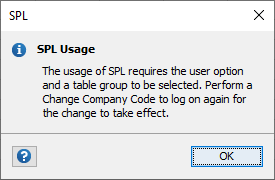
Within User Options in the GL Wand ribbon, tick the “Use SPL” box and select the relevant Table Group from the dropdown. Then Save and click the Change Company Code button from the GL Wand ribbon to re-initiate the logon process.

| Parameter | Description |
|---|---|
| Year | A value, e.g. “2017” |
| Period | Period number e.g. “1” |
| Balance Type | YTD – summarizes the full year balance up to the period parameter input
PTD – summarizes the movement for the period parameter input QTD – summarizes the movement for the quarter based on the period parameter input CTD – summarizes the custom period criteria based on the period parameter input e.g. “2:4” |
| Ledger | The Ledger |
| Actual Flag | A = Actual; B = Budget |
| Version | Enter the applicable Version |
| Currency Type | The Currency Type as configured in SAP e.g. “10” = Company Code Currency |
| SPL Table Group | The table group selected in the user options will be displayed here |
| Company Code | The Company Code |
| GL Account | The GL Account |
| Currency | Optional |
| Movement | Optional |
| Unit of Measure | Optional |
| Custom Fields | Custom Fields configured in the SAP maintenance transaction /n/excel4ap/wands_5_mt |
Authorization Objects
| Authorization Object | Description |
|---|---|
| F_BKPF_KOA | Accounting Document: Authorization for Account Types |
| F_BKPF_BUK | Accounting Document: Authorization for Company Codes |
| F_FAGL_LDR | General Ledger: Authorization for Ledger |
| K_REPO_CCA | CO-CCA: Reporting on Cost Centers/Cost Elements |
| K_CCA | CO-CCA: Gen. Authorization Object for Cost Center Accounting |
| K_PCA | EC-PCA: Responsibility Area, Profit Center |
| F_FAGL_SEG | General Ledger: Authorization for Segment |