System Administrator Configuration Options
Set the configuration options.
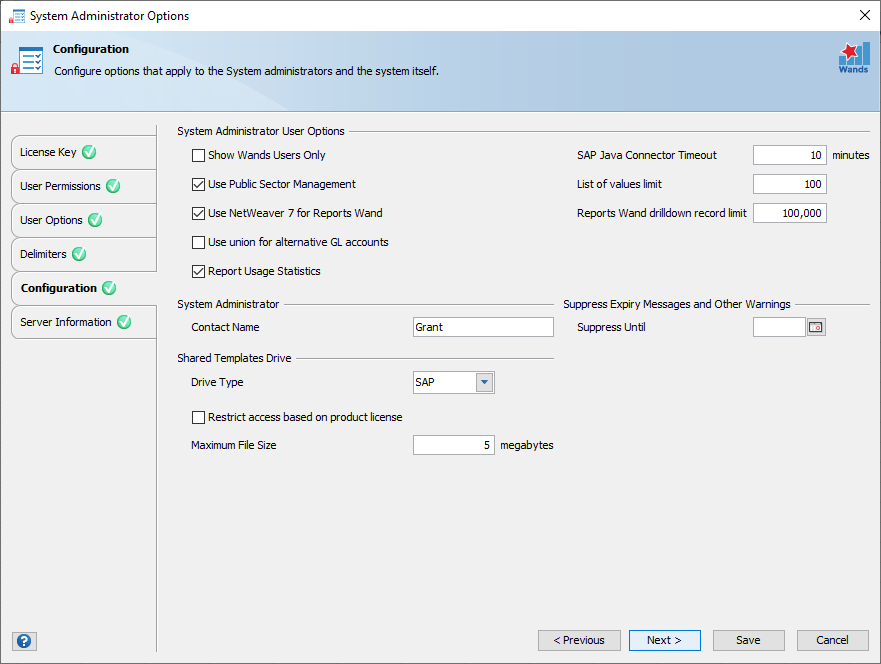
| Option | Description |
|---|---|
| Show Wands Users Only | Tick this option to only load those users that have the Wands role assigned to their SAP user account. This option can help significantly if your SAP user table has many thousands of records in it.
Note: If your SAP user table has more than 50 000 records in it this option will be pre-selected and you will not be able to unselect it. This is due to the fact that the process of loading so many users into this maintenance dialog can be very time-consuming. |
| SAP Java Connector Timeout | Time the SAP Java Connector uses to close a connection. |
| Use Public Sector Management | Tick this option to cache the public sector master data lists of values when logging on. |
| List Of Values Limit | For the interactive lists of values, the limit of how many will be retrieved for each request. |
| Reports Wand Drilldown Record Limit | The maximum records that will be retrieved when running a Reports Wand report. |
| Use Netweaver 7 for Reports Wand | Uses the Reports Wand version that is compatible with older SAP systems. |
| Report Usage Statistics | Tick this option to enable the recording of Reports Wand usage statistics. |
| Use union for alternative GL accounts | Where multiple company codes are used in conjunction with the alternate account functionality, this option will use the union of the mapped GL accounts rather than the intersection. |
| System Administrator Contact Name | The name of the person in your organization that your users should first contact with Wands software queries. |
| Suppress Support Expiry Messages Until | Suppress support expiry warnings until the date entered. The date must be between today’s date and 1 year in the future. Expiry of trial products and notifications of new versions will also be suppressed until this date.
Note: These notifications and warnings are suppressed for users only. Wands administrators will continue to see this messages. |
| Drive Type | Select the Shared Templates Drive type. The options are SAP Database, Dropbox or a central File Server.
Note: It is extremely important to understand the requirements and setup for the selected Drive type, please familiarize yourself with the help for the relevant type before selecting or changing this option. |
| Restrict access based on product license | Restricts access to the shared templates based on the users assigned product license. |
| Maximum File Size | Enter the maximum file size that can be uploaded by Wands products. This also restricts the maximum file size that can be stored in the Shared Templates Drive. |